Saturday, December 31, 2016

Synchronous and Asynchronous transformation


Synchronous transformation is quicker than asynchronous.
But merge join is faster than lookup sometimes, while merge join is asynchronous.
"A asynchronous component requires all the rows from the upstream component
before it begins processing the rows, to do some modification on the data,
and ususally generates a differant number of rows.


In a way, they act as both destination and source, thus they generate
different LineageID for the output columns. Since the mappings in the
downstream is done using the LineageID you need to restore these mappings."


Blocking, Non Blocking and Partial blocking


Non-Blocking
Audit
Character Map
Conditional Split
Copy Column
Data Conversion
Derived Column
Import Column
Lookup
Multicast
Percentage sampling
Row count
Row sampling
Script component


Partially Blocking
Data mining
Merge
Merge Join
Pivot/Unpivot
Term Extraction
Term Lookup
Union All

Blocking
Aggregate
Fuzzy Grouping
Fuzzy Lookup
Sort


Protection Level in SSIS

Protection Level

Error: 

Error: 0xC0202009 at Package, Connection manager "runeet2k8.sa": An OLE DB error has occurred. Error code: 0x80040E4D.
An OLE DB record is available.  Source: "Microsoft SQL Native Client"  Hresult: 0x80040E4D  Description: "Login failed for user 'sa'.".

Solution: 

For providing protection to package , use Protection level as 'Dont savesensitive', which will clear the password from our connection manager,
which will cause our package to fail for login details of connection manager,
for managing this , we can use configuration file, and set password value while executing package through configuration file.

Use EncriptAllWithPassword, when need to give password to open a package

Delay validation


SSIS validates package to ensure that they will execute properly.Sql server  validation occurs both as package is opened(design time validation) and just before the package executes(run time validation).

Design time validation can be performed by seting work offline option.
Run time validation can be stopped by setting delay validation property as true for the package, which will validate during run time.

Delay validation of a single component in Data flow can be set by setting property ValidateExternalMetaData property to false.

Problem- Data Driven subscription-


Not able to create subscriptions for SSRS reports as it give the following error "Subscriptions cannot be created because the credentials used to run the report are not stored, or if a linked report, the link is no longer valid"


Solution-

This error is due to the Windows authentication used for Data source Connection. SSRS requires a Login to connect to the data source to process the report when subscription will be occurring at its scheduled time. 
For this, it is required to store the credential in to Report Server or deploy the Data source with SQL Server Authentication. Use Custom Data Source and save the credential.


Friday, December 30, 2016

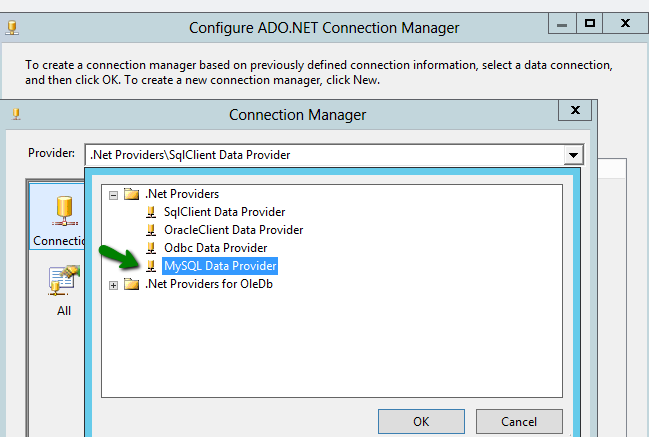
How to connect to MySQL database from SSIS ?

Solution-

1.       Either using ODBC driver
2.       Using .Net SQL client Connector

Using ODBC Driver-

·         Install newer version of ODBC Driver for MySQL 
·         ‘Mysql-connector-odbc-5.2.6-win32’ for Windows with 32 bit.
·         ‘Mysql-connector-odbc-5.3.1-beta-winx64’ for Windows with 64 bit.

Using Dot Net SQL client Connector to MySQL

·         Install latest version of .Net connector for MySQL
·         ‘mysql-connector-net-6.8.3’

Using ODBC Driver---

After installation of ODBC driver, go to Systems and Security->Administrative Tools- > ODBC Data Sources


In SSIS-


Using Dot Net SQL client Connector to MySQL ----In SSIS-


Monday, November 11, 2013

Surrogate key

Surrogate key

  • What is surrogate key?
  • Where do we use a surrogate key?
  • How it is different from the natural key?
  • How do we implement surrogate key?
  • What is the advantage of using a surrogate key?


  • What is surrogate key?

As the name suggests Surrogate means ‘substitute’.
The surrogate key is just another substitute key, that will be used to uniquely identify the rows in a dimension table. The surrogate key will have no business meaning.
It’s internally generated by the system and is invisible to the user or application. Thus its value cannot be modified by user or application.

  • Where do we use a surrogate key?

If the table is not having any attribute (or natural key), that uniquely identify a row.
If the attribute used as unique identifier uses much storage than required. For example, if the attribute is alphanumeric.
When there is doubt of changes in the values of the attribute (used for unique identification of the row)
If the table participates in more than one relationship from the logical data model. Then data needs to be fetched from multiple related tables using joins.
If we want to improve the performance of data retrieval from multiple tables.


  • Difference between Surrogate key and natural key

Surrogate key
Natural key
Don’t have business meaning
Have business meaning, for e.g. SSN number

These can be changed.
Small in size, generally of integer type. Can be created as identity column
Bigger in size, generally alphanumeric or string,
Comparison takes less time , as it compares to integer, joins are fast
Comparison  takes much time, as it converts string or alphanumeric to Ascii , and then comparison takes place, joins are slow
No locking contentions because of unique constraint, as the surrogates get generated by the DB and are cached – very scalable.

Locking contention may occur, as two sessions may try to insert the same unique business key,
Not searchable from application
searchable
An additional index is needed.  
No additional index required
There are often generated by the system .
Records cannot be inserted untill the key is not known, as it has got business meaning


Let's take a simple, classical example:
On the 1st of January 2002, Employee 'E1' belongs to Business Unit 'BU1' (that's what would be in your Employee Dimension). This employee has a turnover allocated to him on the Business Unit 'BU1' But on the 2nd of June the Employee 'E1' is moved from Business Unit 'BU1' to Business Unit 'BU2.' The entire new turnovers have to belong to the new Business Unit 'BU2' but the old one should belong to the Business Unit 'BU1.'
If you used the natural business key 'E1' for your employee within your datawarehouse everything would be allocated to Business Unit 'BU2' even what actually belongs to 'BU1.'
If you use surrogate keys, you could create on the 2nd of June a new record for the Employee 'E1' in your Employee Dimension with a new surrogate key.
This way, in your fact table, you have your old data (before 2nd of June) with the SID of the Employee 'E1' + 'BU1.' All new data (after 2nd of June) would take the SID of the employee 'E1' + 'BU2.'
You could consider Slowly Changing Dimension as an enlargement of your natural key: natural key of the Employee was Employee Code 'E1' but for you it becomes
Employee Code + Business Unit - 'E1' + 'BU1' or 'E1' + 'BU2.' But the difference with the natural key enlargement process, is that you might not have all part of your new key within your fact table, so you might not be able to do the join on the new enlarge key -> so you need another id.


Thursday, October 17, 2013

How to stop any user from dropping any database


How to stop any user from dropping any database


you can prevent casual database deletions with a trigger:

CREATE TRIGGER STOP_DB_DROP
ON ALL SERVER
FOR DROP_DATABASE
AS
PRINT 'You are not allowed to DROP databases'
ROLLBACK;

Monday, September 2, 2013

remove single user mode from a database

How to remove single user mode from a database?


Step1: Fine out the processes, which are using the particular database say ‘AdventureWorks’. This can be find executing below SP
Sp_who2

By executing sp_who2, get the SPID’s which uses particular database


Step 2: Kill that process as below

KILL [SPID]
KILL 52 --For example, if 52 is the SPID, that is using database AdventureWorks

Step 3: Execute Below query

ALTER DATABASE [DatabaseName] SET SINGLE_USER WITH ROLLBACK IMMEDIATE

Step 4: Set multiple user mode on database using below query


ALTER DATABASE [DatabaseName] SET MULTI_USER

Monday, August 26, 2013

Sql Server: index part 4

a.    What is unique index?
b.    What are the advantages and disadvantages of index?


Unique index

  •            By default, Primary key constraint creates a unique clustered index on a table, whereas unique constraint creates unique non clustered index.
  •       When the index is dropped, primary key constraint is also dropped.
  •       Unique is a property of an index (for both clustered and non clustered index.
  •      There is no difference between unique constraint and unique index. When unique constraint is added, then index also gets created behind the scene.
  •       If a UNIQUE constraint is added to a column that has duplicated values, the Database Engine returns an error and does not add the constraint.

Advantages of indexes
  • Indexes provide faster data access during specific data fetch and retrieval form huge data tables. Below are the scenarios in which it works well.
  • Update and delete commands also work well when specific records or range of records are searched for modification or deletion. For example, if an index is created on salary column of employee table, and one has to modify salary for the employees who are having salary 10000, so it will be easier and faster to look for particular records and apply delete and update operations.
  • In case of sorting also, when we ask for a sorted dataset, the database will try to find an index and avoid sorting the results during execution of the query. 
  • In case of grouping also, say one has to count the number of employee as per annual compensation (salary column), and the index is created on salary. Since matching salary appears in consecutive index entries, then the database will be able to count the number of employee at each salary quickly. While if index was not there on salary then it will first sort the results.


Disadvantage
  •  Additional disk space is required in case of non-clustered index.
  • Insert, update and delete can become slow. As it has to locate the records then it takes time in case of huge data and too many indexes are there, because on each DML operation indexes will also be updated.
  • If we update a record and change the value of an indexed column in a clustered index, the database might need to move the entire row into a new position to keep the rows in sorted order. This behavior essentially turns an update query into a DELETE followed by an INSERT, with an obvious decrease in performance. 
for more questions and answers on indexes
Previous      Next

Sql Server: index part 3

a.    What is non clustered index?

b.    How many non clustered indexes can be created on one table?

c.    Can you tell me some example on non clustered index that relates to real life experience?

d.    How non-clustered is different from clustered indexes?


Non-Clustered Index


 non-clustered index can be created as shown below:
create nonclustered index indexname on [TableName](ColumnName)

Some points regarding non-clustered indexex 
  • It’s similar to index in textbook, index at one place and data at other place. These indexes will have the pointers to the storage location of the actual data.

  • A table can have more than 1 non-clustered index, just like in a book, one index in starting of the book, another at the end of the book.

  • A table can only have one Clustered index and up to 249 Non-Clustered Indexes.  If a table does not have a clustered index it is referred to as a Heap.


Difference between Clustered and non clustered index
  • Max one clustered index and max 249 non clustered can be created on each table.

  • Clustered indexing is faster than non-clustered index. As clustered index will always cover  a query ,since it contains all of the data in the leaf node itself.

  •  Non-clustered indexes requires extra disk storage space.

for more questions and answers on indexes
Previous      Next

Sql Server: index part 2

a.    What is a clustered index?
b.    How many clustered indexes can be there for one table?
c.    Can you tell some example on clustered index that relates to real life experience?
d.    When you declare primary key constraint, then which index is created on that column?


Clustered Index

Clustered index is created on Primary key automatically, if there is no clustered index already exists on table. This index determines physical order of data in a table. As there can be only one way, in which data can be arranged on disk or memory, therefore there can be only one clustered index on each table.

One can create clustered index explicitly as shown below
create clustered index indexname on [TableName](ColumnName)

 Some points on clustered indexes
  •  Even when the data is inserted in random order, it will be arranged as per the clustered index created on a particular column. For example, a clustered index is created on empid of employee table, then even though the order of records(empid) inserted is for e.g. 1,4,5,3,2, But when the data will be fetched from the table through a select query, you will see the order of records as 1,2,3,4,5. Data is automatically arranged on sequential ascending order after each insert.

  •  It’s similar to a telephone directory in which data is arranged by the last name.

  • Clustered an index that includes more than one column are called Composite Clustered Index. 

  • Only one clustered index can be created on a table, before creating another, one has to drop the existing clustered index. 

  • A clustered index can be created on a maximum of 16 columns.

  • Clustered the index will always cover a query, since it contains all of the data in the leaf the node itself, or should say table itself

for more questions and answers on indexes
Previous      Next

Sql Server: index part 1

a.    What is index? Why do we need indexes?
b.    What are the various types of indexes in sql server?
c.    How will you check if indexes already exist on a table
d.   
What will happen in case of no indexes?


Indexes are created to provide faster data access during specific data fetch and retrieval form huge data tables.

There are various types of indexes in sql server
a.    Clustered Index
b.    Non clustered index
c.    Unique
d.    Filtered
e.    Spatial
f.     Xml
g.    Full text
h.    Index with computed column
i.     Index with non computed column
  
    Using below procedure we can identify, if indexes exist on a table
Execute sp_helpindex table_name
For example:


In case of No index
If no index exists on a table, a table scan must be performed for each table referenced in a database query. The larger the table, the longer a table scan takes because a table scan requires each table row to be accessed sequentially. Although a table scan might be more efficient for a complex query that requires most of the rows in a table, for a query that returns only some table rows an index scan can access table rows more efficiently.

Next for more questions and answers on indexes
Understanding on Indexes


Sql Server: Understanding on indexes

Understanding on indexes

Indexes are created to provide faster data access during specific data fetch and retrieval form huge data tables.

There are various types of indexes in sql server
a.    Clustered Index
b.    Non clustered index
c.    Unique
d.    Filtered
e.    Spatial
f.     Xml
g.    Full text
h.    Index with computed column
i.     Index with non computed column

Mainly we will discuss here about Clustered index and non clustered index
Before going through understanding about indexes, let’s focus on the questions that one faces.